


네이버 - NAVER
3.51.08K Reviews
App Specs
- Version
- Varies with Device
- Updated On
- License
- Free
- Downloads
- 100,000,000+
- Developer
- NAVER Corp.
- Categories
- Books & Reference
- Platform
- Android, iOS
Screenshots



 Analysis by AppCompare
Ever found yourself diving down a rabbit hole of information, only to emerge hours later with a treasure trove of knowledge you didn’t even know you needed? That’s exactly the kind of experience you can expect with 네이버 - NAVER. As someone who loves exploring new apps, I was eager to see if this popular Korean search engine and portal lived up to its reputation. Let me take you through what I uncovered in my digital journey.
How the first week feels
The initial appeal is easy to understand: one place brings together search and a broad mix of reference and discovery tools. The app is free, developed by NAVER Corp., and sits in the Books & Reference space, though its portal approach makes it feel wider than a traditional reference app. Its large audience—more than 100 million installs—also means that it is not a niche tool built for one narrow task.
For a new user, the useful question is not whether there is plenty to tap, but whether the home screen helps with something you already do. I’d start with one routine, such as checking a word while reading or looking up a topic before a conversation, rather than trying to explore every section at once. That makes the app easier to judge and reduces the chance that its range feels like clutter.
What makes it useful beyond search
The strongest reason to keep a multi-purpose portal is the short path between related tasks. If I’m reading about a subject, I can move from a general search to a dictionary lookup or a blog-style perspective without switching to a separate app immediately. That is a practical advantage over using a plain web search tool for everything, especially when I’m still figuring out what I want to know.
There is a trade-off, though. A broad portal is not automatically the best specialist tool. Someone who wants a focused dictionary, a dedicated news reader, or a shopping app with a particular set of comparison tools may prefer those individual services. I see Naver as a convenient starting point and a useful everyday companion, not a reason to uninstall every app that does one job particularly well.
A realistic use would be a commute or a lunch break: I might search for a place or topic mentioned by a friend, scan a few results, check an unfamiliar Korean word, then save the broader question for later. The benefit is continuity between those little steps. The sensible habit is to stop when I have the answer I need; because discovery can branch quickly, an open-ended browse can consume more time than the original question deserves.
First Impressions and Interface
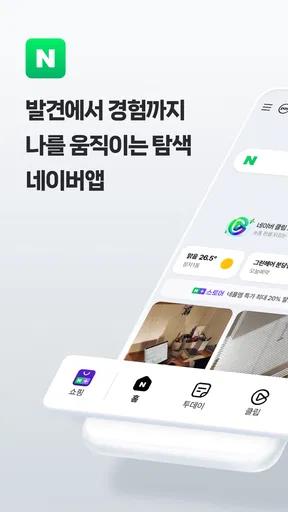
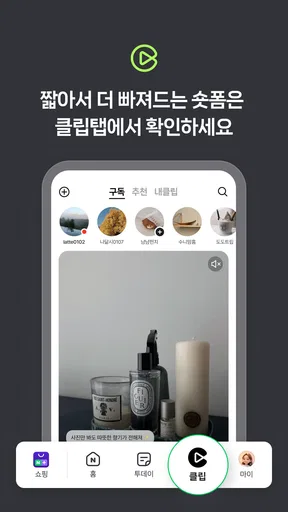
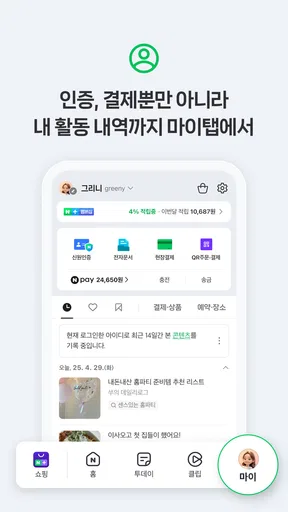
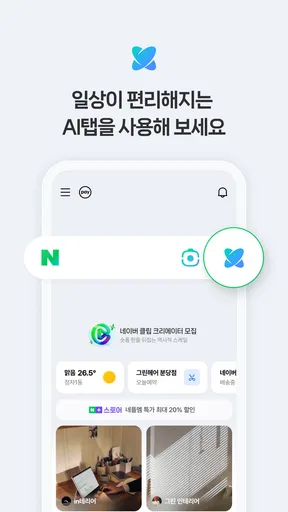
When you first open 네이버 - NAVER, you’re greeted with a sleek interface that’s both vibrant and intuitive. It’s like walking into a well-organized library where every book is right where you’d expect it to be. The home screen is packed with options, but it doesn’t feel overwhelming. Instead, it invites you to explore.
Worth Reading Before You Choose

Baby Panda World Brings Quick Play to Modern Phones, but Its Game Library Feels Busy

ESPN’s Live Game View Makes Following Close Games Easier

QuizzLand Review: A Good Fit for Short Trivia Breaks, Not Every Player

Basketball Stars: Multiplayer Is Fast, but Can It Recover When Matches Go Wrong?

WEBTOON Turns Phone Updates Into a Better Reading Routine

Link to Windows Runs on Shared Habits, Not Social Feeds
The app is divided into neat sections, each catering to different interests. Whether you’re looking for news, blogs, or even a dictionary, 네이버 has it all. The design feels modern and user-friendly, which is a big plus for those who, like me, appreciate an app that doesn’t require a user manual to navigate.
Features Galore
네이버 isn’t just a search engine; it’s a full-fledged portal that offers a plethora of features. Here are some of the highlights:
- News and Articles: Stay updated with the latest happenings around the world. The news section is comprehensive and covers everything from politics to entertainment.
- Blogs: Dive into a sea of blogs covering various topics. Whether you’re interested in tech, lifestyle, or culture, there’s something for everyone.
- Dictionary: Need to look up a word? The built-in dictionary is a handy tool for both native speakers and learners of Korean.
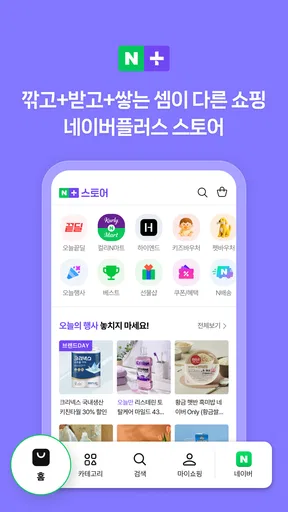
- Shopping: Browse through a wide range of products, compare prices, and even make purchases directly through the app. It’s like having a shopping mall in your pocket.
Each feature is seamlessly integrated, making it easy to switch from one to another without any hiccups. It’s clear that a lot of thought has gone into ensuring that the user experience is smooth and enjoyable.
Performance and Usability
Now, let’s talk about performance. I’ve used apps that promise the moon but deliver little due to lag or crashes. Thankfully, 네이버 isn’t one of those. It runs smoothly on both Android and iOS, with quick load times and no noticeable lag. Even when switching between features, the app remains responsive.
Usability is another area where 네이버 shines. Everything is where you’d expect it to be, and the app’s design makes navigation a breeze. Even if you’re not a tech-savvy person, you’ll find yourself getting the hang of it in no time.
Using it month after month
The novelty of a portal usually fades once you have browsed its main sections. What gives this kind of app lasting value is whether it becomes a small, repeatable part of the day. Naver makes most sense for people who regularly look things up, read different kinds of content, or move between reference and discovery. If those habits are already part of your routine, having them gathered together can save a little friction each time.
I would not make the home screen a default destination just because it offers many options. Instead, I’d use it with a purpose: open it to answer a question, check a source, or find a useful next step, then leave when that task is done. This simple boundary helps keep a rich portal from becoming an endless feed of things that are merely interesting.
Language is worth considering before making it a daily tool. The app’s short store description is in Korean, and its strongest fit is likely to be people comfortable navigating Korean-language services or specifically interested in Korean content. A reader who needs consistently polished results in another language may find a global search engine or a dedicated translation and reference app more predictable for everyday research.
The Social Element
One of the aspects I found particularly engaging is the social element built into the app. You can follow other users, comment on articles, and even share your own content. It adds a community feel that’s often missing in other search engines. It’s like being part of an ever-growing digital conversation.
This feature is perfect for those who love to interact and share their thoughts with others. It’s also a great way to discover new content that you might not have come across otherwise.
Keeping the experience manageable
A multi-section app asks for a little ongoing housekeeping, even when there is no complicated setup. I’d pay attention to which sections I actually return to and make those the focus of my visits. If I notice that I open the app out of habit without a clear reason, that is a sign to narrow my routine rather than add more browsing. The point is to keep the useful shortcuts and ignore the rest.
For research, I also recommend treating search results, articles, and community posts as different kinds of material. A dictionary entry can help with a word; a personal post may offer lived experience; neither should automatically settle a question that needs authoritative confirmation. When accuracy matters, I would compare claims with a primary or specialist source instead of treating a convenient portal as the final word.
That distinction is one of the app’s less obvious trade-offs. Bringing many formats together makes exploration feel fluid, but it can also blur the line between reference and opinion if I move quickly. A deliberate workflow—search first, identify what kind of source I need, then cross-check important details—lets the convenience work in my favor.
Where fatigue can set in
The same variety that makes Naver inviting can make it feel busy over time. If I only want a clean search box, a dedicated search app is likely to be calmer. If I want a carefully curated reading queue, a focused news or reading app may make it easier to maintain that habit without unrelated sections competing for attention. The better choice depends on whether I value breadth or concentration more.
Social features can also change the mood of a tool. Following people and commenting may be enjoyable when I want conversation, but they are not necessary for a quick lookup. I would skip those parts if my main goal is private, distraction-free reference, and I would not assume that every discussion thread has the same reliability as an edited reference source.
People who do not read Korean, do not need its particular mix of services, or prefer each task to live in a specialist app may not get enough recurring benefit to justify keeping it prominent on their phone. That is not a flaw so much as a mismatch: a broad portal rewards repeated use across several interests, while a single-purpose user may see more menus than value.
Who it suits, and what to expect
Naver is best suited to curious users who enjoy moving between search, reading, reference, and community content, especially those with an interest in Korean-language material. It is also a reasonable option for someone who wants to try a broad information app without paying, since it is free and carries an Everyone content rating. Its average rating is around three and a half stars from roughly half a million ratings, a mixed signal that fits an app whose usefulness depends heavily on language, habits, and preferred level of focus.
People often wonder whether it can replace their usual search engine. My view is that it can be a useful alternative for discovery and for users who value its portal approach, but I would keep a familiar general search tool available for tasks where its results or language coverage suit me better. The same applies to shopping: browsing and comparing within a portal can be handy, but I would use a dedicated retailer or comparison service when I need a more specialized buying workflow.
Another practical question is whether the app is worth trying if I only need one feature. Since it is free, trying it for that task is low commitment, but I would give it a fair test within a real routine rather than judge it from a quick tour. If I keep returning to the same useful section, the broader app may earn its place; if I consistently leave for a specialist alternative, that is a clear sign not to force the habit.
Final Thoughts
In conclusion, 네이버 - NAVER is more than just an app; it’s a gateway to a world of information and community. Whether you’re looking to stay informed, explore new interests, or simply pass the time, 네이버 is a fantastic choice. The combination of a user-friendly interface, a wealth of features, and robust performance makes it a standout in its category.
So, if you’re ready to embark on a digital adventure, give 네이버 a try. Who knows what fascinating rabbit holes you’ll find yourself exploring next?
For me, its lasting value comes down to a simple test: does it make a recurring information habit easier, or does it tempt me into browsing without a purpose? If I use it to move efficiently from a question to a useful source, it earns space. If I want quiet, narrow tools with fewer distractions, I’d choose a specialist app instead. That balance is why I’d recommend giving it a deliberate trial, then keeping only the parts that genuinely help.
Pros
- Comprehensive search engine with local focus.
- User-friendly interface and easy navigation.
- Offers a variety of services in one app.
- Real-time news updates and trends.
- Customizable features for personalized use.
Cons
- Limited global content compared to local.
- Heavy app size may affect storage.
- Some features require a network connection.
- Ads can be intrusive for some users.
- Not fully optimized for non-Korean speakers.
FAQs for 네이버 - NAVER
What is NAVER and what features does it offer?
NAVER is a popular South Korean search engine and online platform offering a wide range of services. It includes a search engine, news updates, email service, and webtoons. Users can also access maps, an encyclopedia, and a dictionary. The app provides personalized content and an extensive suite of tools for daily use.
Is NAVER available for international users and in different languages?
While NAVER is primarily targeted towards Korean users, international users can access some features. However, the app is largely in Korean, which might pose a challenge for non-Korean speakers. Despite this, NAVER is working on expanding its language support to accommodate a broader audience.
How does NAVER ensure user privacy and data security?
NAVER takes user privacy and data security very seriously, implementing robust measures to protect personal information. They use encryption and other security protocols to safeguard data. Users should review the privacy policy to understand how their data is used and to ensure their comfort with the platform's practices.
Are there any costs associated with using NAVER?
NAVER is free to download and use, with most services provided at no cost. However, certain premium features or content may require payment. For instance, some webtoons or exclusive content might have a fee. It's advisable to check specific sections of the app for any potential costs.
What devices and operating systems are compatible with NAVER?
NAVER is compatible with both Android and iOS devices, ensuring a wide range of users can access its features. The app works smoothly on most smartphones and tablets, provided the device meets the minimum system requirements. Regular updates ensure it functions well across all compatible platforms.


